The 5-App Stack vs. All-in-One Practice Management
You feel it on Sunday night.
Four browser tabs open before Monday has even started. Calendly for the session time. Stripe to see whether the invoice got paid. Google Docs to find last week's notes. Gmail to dig up the client's request from 11:00 PM on a Thursday.
Nothing is technically broken.
That's the problem.
The five-app coaching stack works just well enough to keep using it. It's cheap. It's flexible. It lets you get started without committing to a real system. Then, quietly, it becomes the thing that keeps your practice feeling smaller than it is.
At some point, every serious coach has to answer a simple question: are you running a collection of apps, or are you building a brand?

What the five-app stack usually looks like
Most independent coaches start with some version of this:
- The scheduler: Calendly or Acuity
- The payment tool: Stripe, PayPal, or invoices sent manually
- The file cabinet: Google Docs, Notion, or Dropbox
- The inbox: Gmail or Outlook
- The tracker: a spreadsheet, notes app, or generic CRM that slowly turns into a junk drawer
On paper, this is a reasonable setup. Each tool does its job. Some of them are genuinely excellent.
But coaching is not a collection of isolated jobs. It's a relationship with a rhythm: intake, scheduling, sessions, notes, follow-up, payment, accountability, renewal. The client experiences all of that as one continuous relationship with you.
When the tools don't talk to each other, the relationship starts to feel fragmented.
The client gets a Calendly link, then a Stripe invoice, then a Google Doc, then a reminder from somewhere else, then a follow-up email buried in a long thread. They don't see a calm professional system. They see the seams.
That may be fine at the beginning. It is not fine forever.
The real cost is administrative friction
The five-app stack looks cheaper than an all-in-one practice platform because the monthly fees are smaller. Sometimes they're free.
That's the wrong math.
The real cost is administrative friction.
It's the 15 minutes you spend searching for the client's last session notes. It's the awkward payment reminder because invoicing wasn't tied to the package. It's the "where do I find the link?" text five minutes before a session. It's the follow-up task you forgot because it lived in your head instead of the client record.
None of these moments feels dramatic. That's why they get ignored.
But if you spend 20% of your week managing the tools around your coaching, you have given away 20% of your revenue-generating capacity. Worse, you have given away attention. And attention is the thing your clients are actually paying for.
High-ticket clients can feel when your practice is held together by duct tape. They may not say it that way. They may not even consciously notice. But they feel the difference between a coach who has a professional container and a coach who is still stitching the experience together by hand.
Professionalism is not about looking bigger than you are. It's about making the work easier to trust.
What changes with a unified workspace
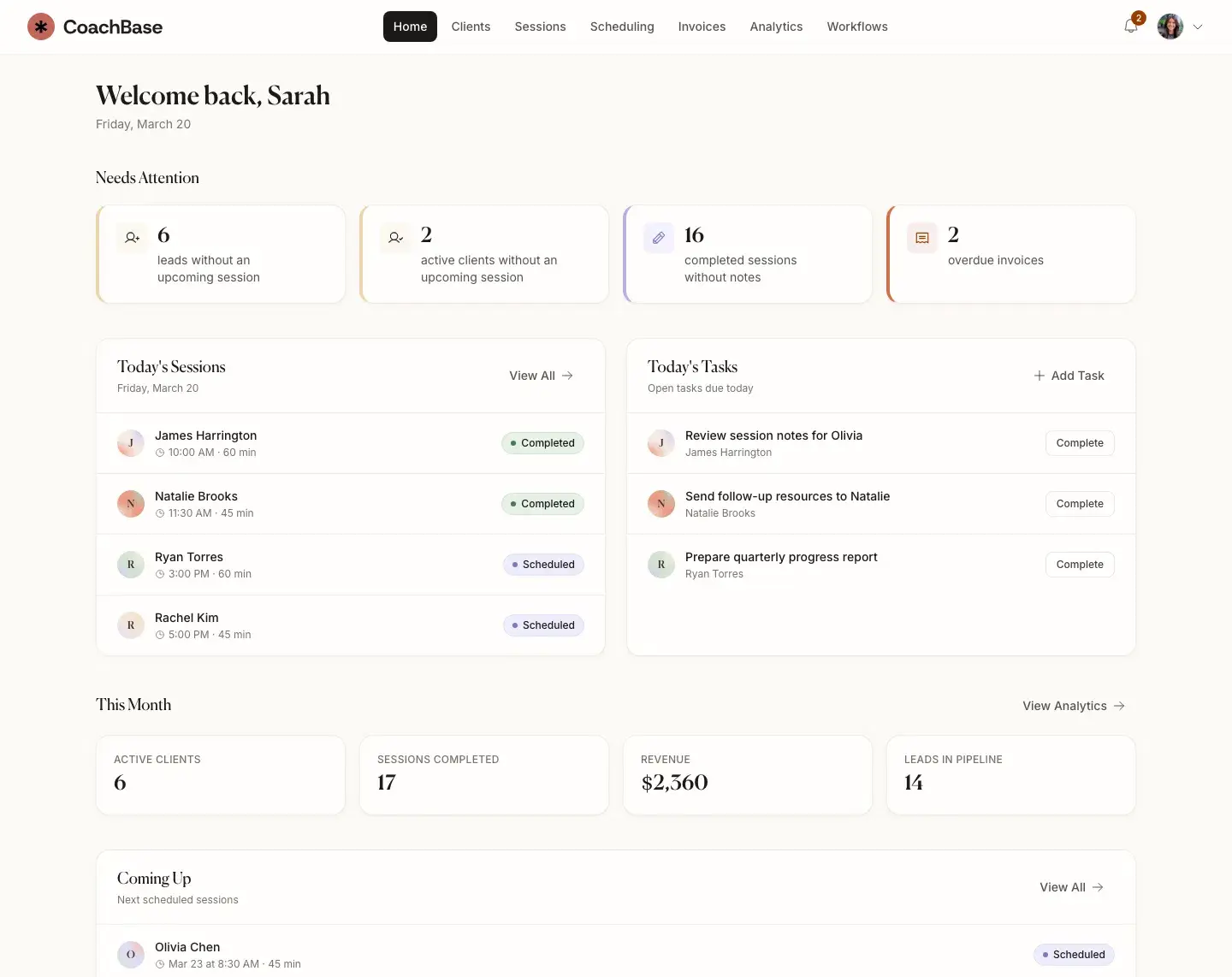
At CoachBase, we built around a different assumption: a coaching practice should live in one place.
Not because one app is cleaner on a pricing page. Because context matters.
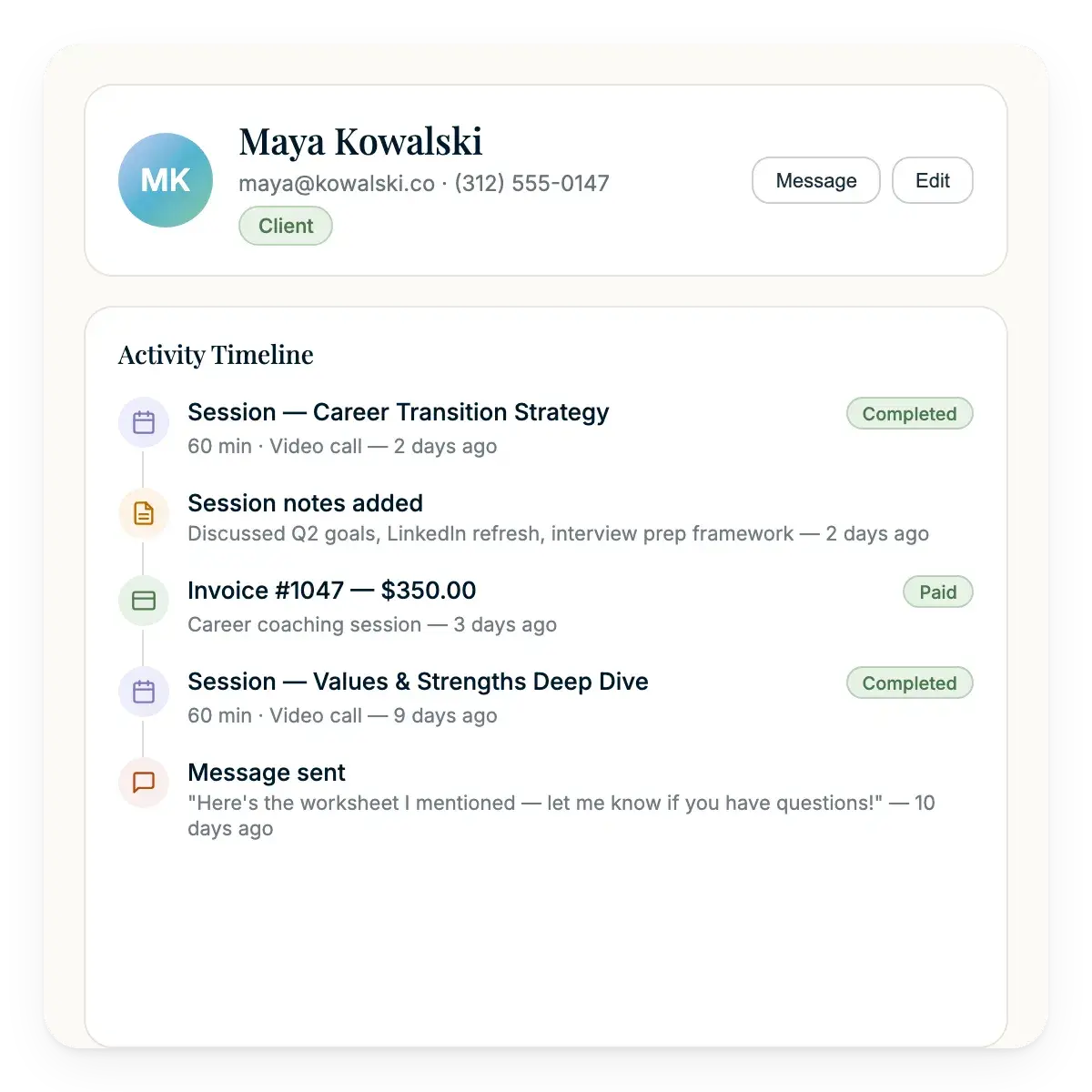
When you open a client profile in CoachBase, you should not have to reconstruct the relationship from scattered clues. You should see the shape of the work:
- The sessions you've had
- The notes and summaries from those sessions
- The package or billing status
- The tasks or commitments still open
- The timeline of what has happened so far
That is the difference between storing information and running a practice.
A unified workspace gives you the thing coaches are constantly trying to recreate manually: context. You walk into the session knowing where the client left off, what they committed to, what changed, and what still needs attention.
That changes the quality of the work.
It also changes how you feel while running the business. Less tab-hopping. Less archaeology. Less "I know I wrote that somewhere." More time in the part of the business only you can do.
Why AI works better inside the system
AI is useful for coaches, but only when it is attached to the actual workflow.
In a five-app stack, session notes often end up as static text in a Google Doc. Maybe you use an AI tool to summarize a call. Then you copy the summary somewhere else. Then you rename the file. Then you try to remember where it belongs.
Congratulations. The robot helped, and somehow you still got admin work.
In CoachBase, AI Session Intelligence is part of the practice record. Session transcripts and summaries connect to the client timeline where they belong. You don't have to copy, paste, file, and reorganize after every call.
That distinction matters.
AI outside the system creates another tab. AI inside the system removes work.
The point is not to make coaching feel automated. The point is to protect the human part of the work by taking the repetitive parts off your plate.
The stack vs. the base
Here is the practical difference.
Booking
- Five-app stack: a generic booking link with manual setup and context living somewhere else
- CoachBase: branded scheduling tied to the client experience and intake flow
Payments
- Five-app stack: separate invoices that may or may not connect to sessions or packages
- CoachBase: billing and package tracking connected to the client record
Notes
- Five-app stack: documents scattered across folders with inconsistent naming and weak search
- CoachBase: a centralized timeline with AI-powered summaries connected to each client
Communication
- Five-app stack: long email threads, missed details, and follow-up tasks that depend on memory
- CoachBase: client history organized around the relationship, not the inbox
Client experience
- Five-app stack: functional, but often confusing and visibly patched together
- CoachBase: calmer, more professional, and easier for the client to trust
How to switch without making it a project
Most coaches avoid switching systems because they picture a massive migration.
Every old note. Every old invoice. Every random Google Doc from two years ago. All perfectly imported, tagged, cleaned, and filed.
That is how you turn a good decision into a six-week avoidance strategy.
Don't move your past. Build your future.
You do not need to migrate every document from 2022 to start operating more professionally. Start with your next client. Then move active clients as it makes sense. Let the old system become an archive instead of a prison.
For current clients, keep the message simple:
"Hi [Client Name], as my practice continues to grow, I'm upgrading my systems so I can provide a more professional and seamless experience. Moving forward, we'll use a new client portal for scheduling, notes, and invoicing. You'll receive an invite shortly. This will keep everything we do in one secure place. Looking forward to our next session."
That's enough.
No long explanation. No apology for improving the experience. Just a clear handoff.
When the five-app stack is still fine
Let's be honest: not everyone needs an all-in-one platform yet.
If you have two clients, coach occasionally, and get paid through Venmo, the stack is probably fine. You do not need infrastructure before you have a real operating rhythm.
But if coaching is your profession, the standard changes.
If you are an executive coach, financial coach, leadership coach, wellness coach, or personal development coach serving serious clients, your systems should reflect the seriousness of the work. Especially if you want to grow beyond what you can personally remember.
A five-app stack can get you from zero to traction. It is not built to get you from 15 clients to 30 without adding weight to every week.
You do not scale a coaching practice by working harder at admin. You scale by removing the admin that should not have required your attention in the first place.

The system behind the session
The session is the visible part of coaching. The system around the session is what makes it work.
A client who knows where to book, what they owe, what they committed to, and where their notes live can focus on the work. So can you.
A client who has to chase links and search emails is carrying operational noise into a relationship that should feel clear.
That is why the tech stack matters. Not because software is the center of your practice. It should not be. The best system fades into the background.
Your tools should make it easier to be present, prepared, and professional.
If your current setup does that, keep it. If it doesn't, don't romanticize the duct tape.
Move to one screen. Save your attention. Build the kind of practice your clients can trust.
Ready to stop stitching the work together by hand? See why we built CoachBase, or explore CoachBase pricing when you're ready for a more unified way to run your practice.